

Introduction
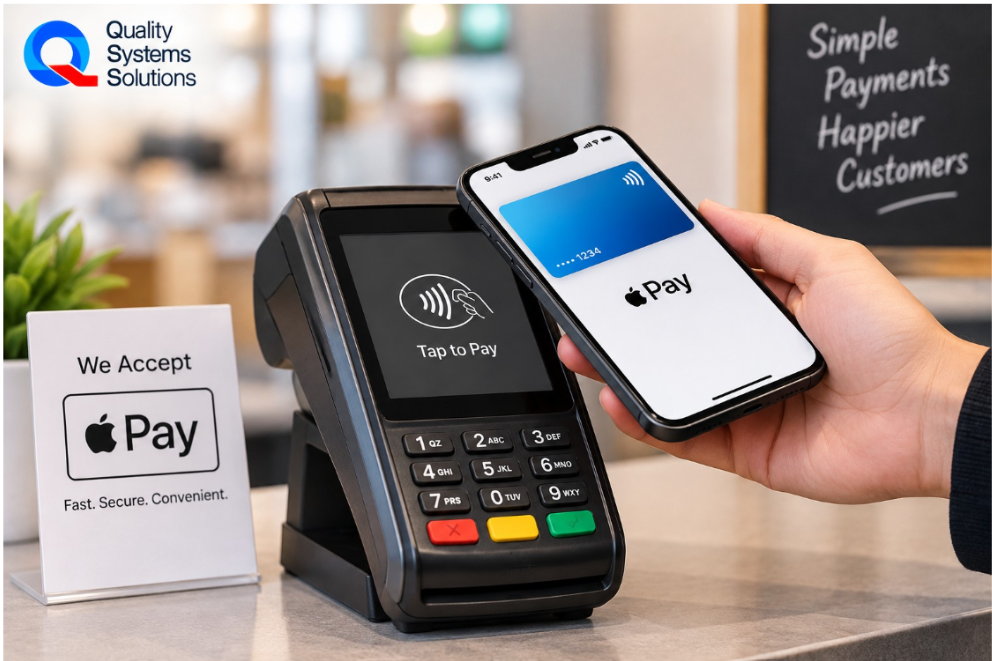
A customer walks up to your checkout counter with a few items, reaches into their pocket, and instead of pulling out a wallet, they hold up their iPhone and ask, "Do you take Apple Pay?"
It's a simple question, but the answer depends on the payment technology already in place. Before making any changes, businesses should review their current terminal, POS system, and payment processor to determine what is already compatible with Apple Pay.
The first step is to assess your existing payment environment. Check whether your terminal supports contactless payments and whether your current payment processor and POS system can handle Apple Pay. This assessment will help determine what, if anything, needs to be updated before you begin.
Before discussing the setup process, it's important to understand that Apple Pay isn't a separate payment processor or merchant account. It works through the payment infrastructure many businesses already use every day. If you're new to digital wallets, it's worth taking a few minutes to understand exactly what Apple Pay is and how it securely processes payments before moving forward. For businesses exploring Apple Pay for business, the first step is understanding whether their current payment setup can support it.
This guide will walk you through the steps involved in accepting Apple Pay, explain what equipment and services you actually need, and help you avoid common mistakes that can slow down the process.
Apple Pay for Business: Check Whether Your Business Is Already Ready
Apple Pay compatibility starts with understanding how your current payment environment handles contactless transactions. Modern payment terminals commonly use Near Field Communication (NFC), which enables payments from devices such as iPhones, Apple Watches, and contactless cards. Reviewing your existing equipment and payment setup is the best way to determine whether any changes are needed.
Does Your Payment Terminal Support Contactless Payments?
The easiest place to start is your payment terminal.
Many modern terminals already include contactless payment capability. If you see the familiar contactless symbol on the front of your payment device, there's a good chance the hardware already supports Apple Pay. Even if you've never accepted a contactless payment before, the capability may already exist within the terminal.
Businesses are often surprised to learn that their equipment was designed to accept contactless payments from the day it was installed. The feature simply hasn't been activated or configured correctly.
This is why replacing equipment should rarely be the first step. Understanding your current hardware can prevent unnecessary expenses and help you move toward Apple Pay much faster.
Is Contactless Already Enabled?
Having compatible hardware doesn't always mean the feature is active.
Some payment processors require contactless functionality to be enabled within the merchant account before the terminal can begin accepting Apple Pay transactions. In other cases, the payment device may simply need updated software or configuration settings before the feature becomes available.
Because every payment environment is slightly different, it's worth confirming whether contactless payments have already been enabled before assuming additional equipment is necessary.
For many businesses, this turns out to be a simple administrative change rather than a technical project.
Do You Need New Hardware?
Sometimes the answer is yes.
If your payment terminal is older and was manufactured before contactless technology became common, upgrading the customer-facing payment device may be necessary. However, that doesn't usually mean replacing your entire POS system.
Many businesses can continue using the software and checkout workflow they're already familiar with while simply adding a newer payment terminal that supports contactless transactions.
This is one of the biggest misunderstandings surrounding Apple Pay. Business owners often assume accepting digital wallets requires replacing everything at the checkout counter, when in reality, only one component may need to change.
If you're unsure whether your existing equipment already supports Apple Pay, our guide on How Easy It Really Is to Install Apple Pay explains how to identify compatible terminals and what to expect if a hardware upgrade is required.
The Five Things You Need Before You Can Accept Apple Pay
Once you've confirmed your current equipment, the next step is understanding what actually makes Apple Pay work.
Contrary to popular belief, accepting Apple Pay doesn't require an entirely new payment ecosystem. Most businesses already have several of the necessary components in place. The goal is making sure those components work together correctly.
Before you begin, make sure you have:
A contactless payment terminal
A compatible payment processor
A POS system that supports contactless payments
A merchant account
A reliable and secure internet connection
A Contactless Payment Terminal
The customer-facing payment terminal is the most visible requirement because it's where the Apple Pay transaction actually takes place.
When a customer taps their iPhone or Apple Watch against the reader, the terminal communicates securely with the payment network using NFC technology. If the terminal doesn't support contactless payments, the transaction cannot begin regardless of which POS system or payment processor the business uses.
For businesses planning future growth, investing in modern contactless hardware also helps prepare for increasing adoption of digital wallets and contactless card payments.
A Compatible Payment Processor
Apple Pay doesn't process payments itself.
Instead, it relies on payment processors that already handle Visa, Mastercard, American Express, and Discover transactions. The processor authorizes the payment, routes it through the appropriate card network, and deposits the funds into the business's merchant account just as it would with a traditional card transaction.
Because Apple Pay works through existing payment infrastructure, many businesses discover they don't need to change processors at all. They simply need to verify that their current provider supports contactless payments.
A Merchant Account
Every business accepting card payments already uses a merchant account, even if it's managed behind the scenes by a payment provider.
The merchant account continues performing the same role after Apple Pay is enabled. Funds settle through the existing payment relationship, daily batches remain familiar, and accounting processes generally stay the same.
From a business owner's perspective, very little changes behind the scenes.
A Compatible POS System
Your POS system should communicate smoothly with your payment terminal so transactions, inventory updates, loyalty rewards, and reporting continue functioning as expected.
Fortunately, many modern POS platforms already support Apple Pay without requiring significant operational changes. Employees continue ringing up sales exactly as they do today, while customers simply choose a different payment method at the end of the transaction.
For businesses already using integrated POS solutions, enabling Apple Pay often feels less like adopting a new technology and more like activating another feature within an existing system.
A Reliable and Secure Internet Connection
Although some payment environments include offline capabilities for certain transaction types, businesses should always aim to provide reliable internet connectivity for day-to-day payment processing.
A stable network helps payment terminals communicate with processors quickly, reduces transaction delays, and supports a smooth customer experience at checkout.
Equally important is network security. Payment terminals, POS systems, and connected business devices all rely on the underlying network infrastructure to communicate safely. Maintaining a secure and reliable connection helps protect customer payment information while minimizing operational interruptions.
By ensuring these five components are in place, businesses create the foundation needed to begin accepting Apple Pay confidently and without unnecessary disruption.
Step 1: Confirm Your Payment Processor Supports Apple Pay
Once you've confirmed that your payment terminal is capable of accepting contactless payments, the next step is making sure your payment processor supports Apple Pay.
This is where many business owners become confused because the payment process involves several moving parts. Your POS system records the sale, your payment terminal captures the customer's payment, and your payment processor communicates with the card networks to authorize and settle the transaction. Apple Pay doesn't replace any of these services. Instead, it works alongside them, using the payment infrastructure you already rely on every day.
For many businesses, this means the payment processor simply needs to enable contactless transactions on the merchant account. In other cases, a software update or configuration change may be required before Apple Pay becomes available. The important takeaway is that enabling Apple Pay is usually about verifying compatibility rather than replacing your existing payment provider.
If you're unsure whether your current processor already supports Apple Pay, a quick conversation with your technology provider can usually provide the answer. They can confirm whether your merchant account is ready for contactless payments or identify any changes needed before you begin accepting them.
Step 2: Make Sure Your POS System Is Compatible
Your POS system plays an important role in creating a smooth Apple Pay experience, but not in the way many business owners assume.
Apple Pay transactions are processed through the payment terminal, while the POS system manages the sale itself. When both systems communicate properly, transactions are recorded automatically, inventory updates in real time, loyalty rewards are applied correctly, and reporting remains accurate without requiring additional manual work.
Businesses using modern POS platforms often discover that Apple Pay integration is already supported. The checkout process remains exactly the same for employees. They ring up the sale as usual, while customers simply choose to pay by tapping their iPhone or Apple Watch instead of inserting a physical card.
Integrated POS Systems
Integrated POS environments offer the smoothest Apple Pay experience because every part of the transaction works together.
The payment terminal communicates directly with the POS software, allowing sales information, payment confirmation, inventory updates, and reporting to remain synchronized. Employees don't have to enter transactions twice or switch between separate systems, reducing the chance of errors while improving checkout efficiency.
For businesses with multiple checkout lanes, integrated systems also make software updates and reporting much easier to manage from a central location.
Standalone Payment Terminals
Not every business operates a fully integrated POS environment.
Many retailers, specialty stores, service businesses, and seasonal operations use standalone payment terminals for card processing. The good news is that these devices can often accept Apple Pay just as easily, provided they support contactless payments.
In these situations, Apple Pay functions like any other card transaction. Customers tap their device, the payment is authorized, and the transaction settles through the existing merchant account. From the customer's perspective, the experience remains quick and familiar.
Cloud-Based POS Systems
Businesses using cloud-based POS platforms are often well positioned to support Apple Pay because these systems are designed to receive software updates, security improvements, and new payment features more efficiently than many older on-premise systems.
Cloud-based environments also simplify business management by providing centralized reporting, inventory visibility, and remote access across multiple locations. As digital payment methods continue evolving, businesses with modern cloud-based systems are generally better prepared to adopt new technologies without major operational disruptions.
Step 3: Enable Contactless Payments
After confirming that your payment processor and POS system support Apple Pay, the next step is enabling contactless payments on your payment terminal.
This is the stage where many business owners expect a complicated installation process. In reality, the work is often much simpler than anticipated.
Depending on your payment environment, enabling Apple Pay may involve updating the terminal's software, activating contactless functionality on the merchant account, or downloading new configuration settings. In many cases, these changes can be completed remotely without interrupting normal business operations.
If newer hardware is required, the upgrade is usually limited to the customer-facing payment terminal rather than the entire POS system. Employees continue using the same checkout software they're already familiar with, making the transition much easier than many owners expect.
Once contactless payments have been enabled, the terminal is generally capable of accepting not only Apple Pay but also other NFC-based payment methods such as contactless credit cards and additional digital wallets. This means businesses aren't simply enabling one payment option; they're preparing their checkout environment for the growing preference toward tap-to-pay transactions.
The most important part of this stage is making sure every component has been configured correctly before customers begin using it. A properly configured system reduces transaction errors, minimizes customer frustration, and creates a checkout experience that feels effortless from the very first tap.
Step 4: Test Apple Pay Before Customers Use It
Once Apple Pay has been enabled, it's tempting to assume everything is ready to go. However, taking a few minutes to test the setup before announcing it to customers can prevent unnecessary confusion at the checkout counter.
A successful test does more than confirm that a payment goes through. It verifies that every part of the transaction works as expected, from payment authorization and receipt printing to sales reporting and daily settlement. The objective is to identify and resolve any small issues before they affect real customers.
Start by completing a few low-value transactions using Apple Pay. Confirm that the payment is approved, the receipt prints correctly if required, and the transaction appears accurately in your POS system. If your business offers loyalty rewards or promotional pricing, verify that these features continue working normally with Apple Pay transactions.
It's also worth processing a refund or voiding a test transaction to ensure these functions work as expected. While customers hope they'll never need a refund, employees should feel confident handling one if the situation arises.
Involve Your Employees Before Launch
Your staff doesn't need extensive training to accept Apple Pay because the checkout process remains almost identical to a standard card transaction. However, they should understand how Apple Pay works well enough to assist customers who may be using it for the first time.
Employees should know where customers should tap their device, how to recognize a successful transaction, and what to do if a payment isn't immediately approved. These situations are uncommon, but having prepared employees creates a smoother customer experience and reduces unnecessary delays during busy periods.
A short demonstration before launch often provides all the training most teams need. Once employees see a few successful transactions, accepting Apple Pay quickly becomes part of their normal checkout routine.
Step 5: Let Customers Know You Accept Apple Pay
Enabling Apple Pay is only part of the process. Customers also need to know it's available.
Many businesses invest time and money updating their payment systems but forget to communicate the change. As a result, customers continue reaching for their wallets because they assume contactless payments aren't supported.
Making Apple Pay visible encourages adoption while helping customers enjoy the faster checkout experience you've invested in providing.
Start Inside Your Store
The easiest place to promote Apple Pay is at the point where customers make purchasing decisions.
Window decals, countertop signs, and small contactless payment stickers near the payment terminal immediately let customers know they can tap to pay. These visual reminders eliminate uncertainty and reduce the number of customers asking whether Apple Pay is accepted.
Businesses don't need large promotional displays. A simple sign placed near the register is often enough to encourage customers to use their preferred payment method.
Update Your Digital Presence
Your online presence should reflect the payment options available in your store.
Adding Apple Pay acceptance to your website, Google Business Profile, and social media pages helps customers know what to expect before they even visit. This may seem like a small detail, but for customers who regularly use digital wallets, it can influence where they choose to shop.
If your business offers online ordering or curbside pickup, mentioning Apple Pay on those pages also creates a more consistent customer experience across every sales channel.
Encourage Customers to Try It
Some customers will immediately begin using Apple Pay once they know it's available. Others may simply continue paying the way they always have.
That's perfectly normal.
Rather than encouraging every customer to switch, focus on making Apple Pay another convenient option. As more consumers become comfortable with digital wallets, usage tends to increase naturally without requiring aggressive promotion.
Common Mistakes Businesses Make When Setting Up Apple Pay
Most Apple Pay implementations are straightforward, but a few common misconceptions can make the process seem more complicated than it actually is.
Understanding these mistakes before beginning can save both time and unnecessary expense.
Assuming a New POS System Is Required
Perhaps the biggest misconception is that Apple Pay requires replacing the entire POS system.
In many cases, businesses only need a compatible payment terminal or a simple software update. Replacing equipment before evaluating the existing setup often leads to unnecessary costs that could have been avoided with a proper assessment.
Before purchasing new technology, it's worth confirming exactly which components are already compatible.
Skipping Software and Firmware Updates
Even modern payment terminals rely on current software to perform properly.
Businesses that postpone updates may discover that contactless functionality doesn't work as expected or that important security improvements haven't been installed. Keeping payment devices updated helps ensure compatibility while reducing the likelihood of avoidable technical issues.
Forgetting Employee Communication
Although Apple Pay requires very little staff training, employees should still know that the business now accepts contactless payments.
Cashiers who understand the process can confidently answer customer questions, guide first-time users, and recognize when a transaction has been completed successfully. A brief team meeting before launch is often enough to prepare employees for the change.
Overlooking Network Reliability
Payment terminals communicate with processors through the business network, making reliable connectivity an important part of the customer experience.
Intermittent internet issues, unstable Wi-Fi, or poorly maintained network equipment can create transaction delays that customers may mistakenly associate with Apple Pay itself. Reviewing network performance before launch helps create a smoother checkout experience while reducing unnecessary troubleshooting later.
What Happens After You Start Accepting Apple Pay?
One of the biggest surprises for business owners is how little changes after Apple Pay has been enabled.
Customers may begin paying differently, but the way businesses manage transactions remains largely the same. Sales continue flowing through the existing payment processor, deposits arrive through the same merchant account, and employees continue using the same checkout procedures they've always followed.
From an operational perspective, Apple Pay simply becomes another accepted payment method rather than an entirely new payment system.
Daily reporting, end-of-day reconciliation, and accounting processes generally remain unchanged. Apple Pay transactions appear alongside other card payments, making it easy to review sales activity without introducing additional administrative work.
For many businesses, the only noticeable difference is that checkout becomes faster for customers who prefer using digital wallets. Over time, those small improvements can contribute to shorter queues, smoother transactions during busy periods, and a more modern payment experience without requiring significant changes to daily operations.
Why More Businesses Are Accepting Apple Pay
Customer payment habits have changed significantly over the past few years. Carrying a physical wallet is no longer the only way people expect to pay, and for many customers, it isn't even their preferred option. Whether they're buying groceries on the way home, grabbing lunch during a work break, or making a quick retail purchase, they increasingly expect to complete transactions with the device already in their hand.
For business owners, accepting Apple Pay isn't about following a trend or adding another payment logo to the checkout counter. It's about keeping pace with the way customers already prefer to shop. Businesses that offer flexible payment options create a smoother checkout experience while removing small points of friction that can influence purchasing decisions.
Apple Pay also fits naturally alongside other contactless payment methods. Once a business enables contactless payments, it can generally accept contactless credit and debit cards as well as other digital wallets, such as Google Pay and Samsung Pay, through the same compatible payment terminal. Instead of preparing for one payment method, businesses position themselves for the continued growth of contactless payments as a whole.
If you're still deciding whether enabling Apple Pay makes business sense, it's also worth considering the opportunities businesses miss by not offering it. We've explored that topic in detail in What It Costs You to Not Accept Apple Pay, including the impact on customer convenience, checkout efficiency, and long-term competitiveness.
How QSS Helps Businesses Accept Apple Pay
Every business has a different payment environment. Some already have modern payment terminals with contactless capabilities built in, while others may be working with older hardware that requires upgrades. The challenge isn't simply enabling Apple Pay. It's identifying the most efficient path based on the equipment and systems already in place.
That's where QSS helps.
Rather than recommending unnecessary replacements, QSS begins by evaluating your current payment setup. The team reviews your payment terminal, POS system, payment processor, and merchant account to determine whether your existing environment already supports Apple Pay or if only a few targeted updates are needed. In many cases, businesses discover they're much closer to accepting Apple Pay than they originally thought.
Making the Most of Your Existing Technology
Replacing an entire POS system is rarely the first recommendation.
QSS works with businesses to determine whether existing equipment can be updated, reconfigured, or integrated with newer payment devices before suggesting new hardware. This approach helps businesses control costs while minimizing operational disruption.
For companies already using modern POS platforms, enabling Apple Pay is often a straightforward process that allows employees to continue using familiar workflows while providing customers with an improved checkout experience.
Supporting Trusted Payment Solutions
Businesses using platforms such as Clover and Shift4 can benefit from solutions designed to support secure, reliable, and efficient payment processing.
QSS helps configure these environments so Apple Pay works seamlessly alongside existing payment methods, allowing businesses to accept contactless transactions without changing the way they manage daily operations. Because these systems integrate payment processing with reporting and POS functionality, business owners continue using the same operational processes while simply expanding the payment options available to customers.
Local Support Beyond Installation
Accepting Apple Pay is only one part of maintaining a modern payment environment.
As technology evolves, businesses need reliable support for software updates, equipment maintenance, payment security, and future upgrades. QSS provides ongoing local support for businesses throughout New Jersey and New York City, helping clients adapt as payment technology continues to evolve.
Businesses also benefit from taking a broader view of their technology infrastructure. When payment systems, POS software, networking, and IT services work together as one coordinated environment, day-to-day operations become easier to manage and future upgrades become less disruptive. That's why many businesses are moving toward a unified POS and IT strategy that simplifies technology management while improving long-term reliability. For a deeper look at how this approach can benefit businesses, read One Team, One Stack: The Strategic Advantage of Unified POS + IT for NYC and NJ Operators.
Conclusion
Accepting Apple Pay is often much simpler than business owners expect. Many businesses already have compatible payment terminals, established merchant accounts, and POS systems capable of supporting contactless payments. The process is frequently a matter of confirming compatibility, enabling the right settings, and testing the system before introducing it to customers.
By taking a structured approach, businesses can avoid unnecessary equipment purchases while providing customers with the fast, secure, and convenient payment experience they increasingly expect. Whether you operate a grocery store, restaurant, retail shop, or specialty business, enabling Apple Pay helps modernize the checkout experience without requiring major changes to your daily operations.
If you're unsure where to begin, start by evaluating the payment technology you already have. You may be much closer to accepting Apple Pay than you realize.
Frequently Asked Questions
Do I need a new POS system to accept Apple Pay?
Not necessarily. Many businesses already have a POS system that supports Apple Pay. The determining factor is often the payment terminal rather than the POS software itself. If your terminal supports contactless payments and your payment processor has enabled the feature, you may be able to accept Apple Pay without replacing your existing POS system.
Can my current payment terminal support Apple Pay?
Many payment terminals installed in recent years already include NFC technology for contactless payments. If your device has the contactless payment symbol, it may already support Apple Pay. Your payment provider or technology partner can confirm whether the feature is enabled or whether a software update is required.
Does Apple Pay work with Clover?
Yes. Clover supports Apple Pay on compatible contactless payment devices. Once contactless payments have been enabled and the terminal has been configured correctly, customers can pay using their iPhone, Apple Watch, or other supported Apple devices without changing the normal checkout process.
Does Apple Pay work with Shift4?
Yes. Shift4 supports Apple Pay through compatible payment terminals and payment processing environments. Businesses using Shift4 should confirm that their equipment and merchant account are configured for contactless payments to ensure Apple Pay transactions process correctly.
Is Apple Pay secure for businesses?
Apple Pay uses tokenization and customer authentication to help protect payment information during every transaction. Instead of transmitting the customer's actual card number, Apple Pay uses a secure token, reducing the amount of sensitive payment data handled during the transaction while maintaining the familiar payment process businesses already use.
Does Apple Pay cost businesses extra?
Apple Pay itself does not require businesses to pay Apple a separate fee for accepting payments. Businesses continue working with their existing payment processor and merchant account. Any payment processing costs are determined by the business's existing processing agreement rather than by Apple Pay itself.
How long does it take to start accepting Apple Pay?
The timeline depends on your current payment environment. Businesses with compatible contactless payment terminals may only need a configuration update or software change, while older systems may require new payment hardware. In many cases, businesses can begin accepting Apple Pay much sooner than they expect.
How can QSS help my business get started?
QSS helps businesses evaluate their existing payment setup, determine Apple Pay compatibility, configure contactless payment terminals, and support implementation with trusted payment technologies such as Clover and Shift4. Ongoing local support also helps businesses maintain reliable payment systems as technology continues to evolve.
Ready to Start Accepting Apple Pay?
Accepting Apple Pay doesn't have to mean replacing your POS system or investing in an entirely new payment environment. In many cases, your business already has most of the technology needed to support contactless payments.
QSS can review your current payment setup, identify what's already compatible, and recommend the most efficient path to accepting Apple Pay. Whether you need a simple configuration update, a payment terminal upgrade, or guidance on integrating Apple Pay with your existing POS system, our team can help you move forward with confidence.
Contact QSS today to find out how close your business is to accepting Apple Pay.