

Best Restaurant POS Systems: A Real-World Guide for NYC & NJ Kitchens
Most restaurant POS systems promise the moon but fail when the kitchen heats up. You need more than flashy features—think uptime, local support, and smooth payment processing that won’t freeze during rush hour. This guide breaks down the best restaurant POS systems for NYC and NJ kitchens, showing you what fits your style—counter service, full service, or multi-location—and flags to watch out for. Ready to cut downtime and keep your service flowing?
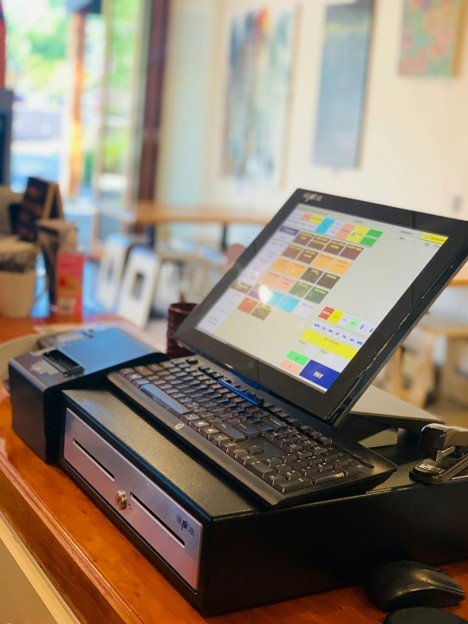
What Makes a POS the Best
Choosing the right POS system can make or break your business. It’s not just about features; it’s about having a reliable partner that ensures smooth operations, especially during peak hours.
Reliability and Uptime Matter
Imagine your busiest time, with customers lined up. The last thing you want is a system crash. Uptime is crucial. A reliable POS guarantees that your transactions process smoothly, even when the kitchen is buzzing. 99.9% uptime is often the industry benchmark, ensuring that your business never misses a beat. But reliability isn’t just about uptime; it’s about having a system that handles peak loads without a hitch. Most people assume all POS systems are the same, but those small differences can make a huge impact when you’re in the weeds.
Essential Support Features
Local support can be a game changer. When problems arise, having a team that understands your specific needs is invaluable. It’s like having a tech-savvy friend on call, who knows your business inside out. Quick response times, especially during critical hours, are non-negotiable. Picture this: a busy evening, a glitch occurs, and within minutes, you have expert help on site. That’s peace of mind. Many think 24/7 support means long wait times; in reality, with the right local partner, it means instant solutions.
Key Integrations to Consider
Integrations ensure your POS isn't just a standalone tool but a part of a larger ecosystem. Whether it’s linking with your inventory management, accounting software, or kitchen display systems, seamless integration keeps everything in sync. A POS that connects with restaurant payment processing can make transactions quicker and more secure. Most people believe integrations are complex, but with the right setup, they simplify operations instead.
Comparing Popular POS Options
When comparing POS systems, it’s essential to match them to specific restaurant needs. Different setups require different solutions, whether you’re running a deli or a multi-location bistro.
Best for Counter Service
Counter service spots need speed and simplicity. Systems like Square/Block offer easy setups and user-friendly interfaces. They streamline transactions, making them perfect for fast-paced environments. Imagine quickly ringing up a customer with a few taps, reducing lines and keeping your staff focused on service. Some think a simple system means fewer features, but it’s about having the right ones.
Ideal for Full Service
Full-service restaurants require POS systems that manage tables, split checks, and cater to customer preferences. Clover POS excels here, offering detailed table management and customization options. This lets your staff focus on enhancing the dining experience rather than wrestling with technology. Most assume more features mean complexity, but with intuitive design, it simplifies operations instead.
Multi-Location POS Solutions
Running multiple locations? Systems like Linga and Kurv offer central management, helping you oversee everything from one dashboard. This means consistent service and easy management of inventory across locations. Imagine updating a menu item at one location, and it automatically updates everywhere. Many think multi-location systems are costly, but they often save more by reducing errors and streamlining processes. Also, Kurv provide FREE Apply Pay setup and FREE equipment, making expanding your business's payment variety a breeze.
Quick Wins and Caution Flags
Navigating the world of POS systems can be tricky, but a few quick wins and common pitfalls can make all the difference.
Quick Wins for Restaurant Owners
Start with training. Well-trained staff can use the system efficiently, reducing errors and improving service speed. Regularly update your system to benefit from the latest features and security patches. Consider using kitchen printers and KDS to streamline orders and reduce errors. Most people think updates are just for tech improvements, but they often enhance security, too.
Common POS Pitfalls to Avoid
Avoid the trap of underestimating your needs. A cheap system might save money upfront, but can cost more in the long run with downtime and lost sales. Don’t overlook security; ensure your POS is EMV and PCI compliant to protect customer data. Many assume security is an optional add-on, but it’s essential for trust.
How to Choose the Right POS
Choosing the right POS boils down to understanding your specific needs. Consider factors like the size of your operation, your busiest times, and your budget. Think about future growth and choose a system that scales with your business. The longer you wait, the more you risk facing operational hiccups. Remember, the best POS is one that fits seamlessly into your workflow, improving efficiency and enhancing service. By focusing on reliability, support, and integration, you’ll find a partner in technology that supports your journey.