

The Hidden Cost of POS Downtime: What It's Costing Your Business Every Hour
Introduction: The True Cost Starts After the System Goes Down
When a point-of-sale system stops working, most business owners immediately think about one thing: lost sales.
While missed transactions are certainly expensive, they represent only a fraction of the actual financial impact. The real cost of POS downtime continues long after the system comes back online. Businesses often spend hours or even days recovering from delayed orders, inventory discrepancies, employee inefficiencies, and customer complaints.
Today's POS systems do much more than process payments. They connect inventory management, customer loyalty programs, online ordering, employee scheduling, reporting, and payment processing into one centralized platform. When that platform becomes unavailable, it can disrupt every connected process.
For restaurants, retailers, grocery stores, and convenience stores operating throughout New Jersey and New York City, even a brief interruption during peak business hours can create operational challenges that extend well beyond the checkout counter.
Understanding these hidden costs allows business owners to make smarter technology investments, reduce operational risk, and build a more resilient business.
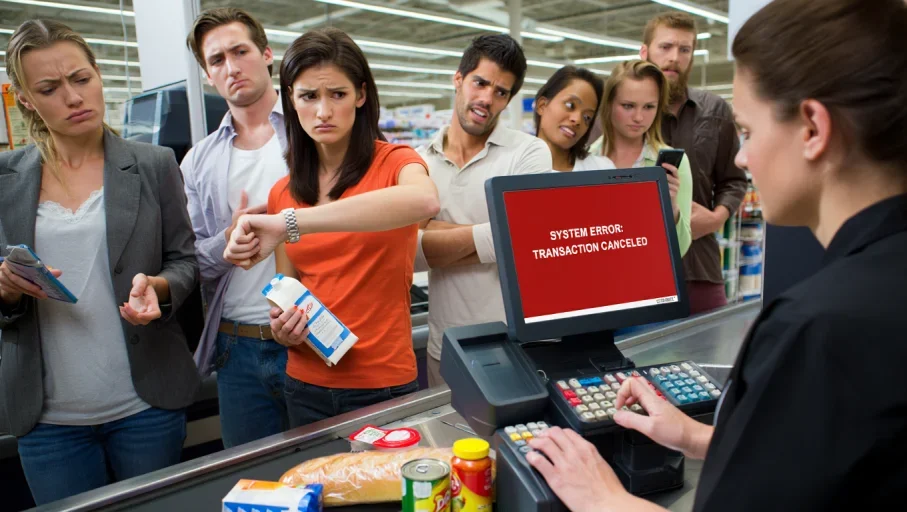
Why Most Businesses Underestimate POS Downtime
Many businesses evaluate downtime by calculating only the sales they were unable to process during the outage.
Unfortunately, this approach ignores many expenses that quietly affect profitability.
A POS outage influences employees, customers, inventory, reporting, payment processing, and even future purchasing behavior. Some consequences appear immediately, while others continue affecting the business long after operations return to normal.
Industry research consistently shows that even short technology disruptions can have a significant financial impact. According to IBM's Cost of a Data Breach Report, operational interruptions can create long-term business costs beyond immediate revenue loss. Gartner also notes that downtime often affects multiple business functions simultaneously, increasing recovery time and operational complexity.
Looking Beyond Lost Sales
Imagine a restaurant experiencing a 45-minute POS outage during the dinner rush.
The immediate loss includes delayed transactions and slower table turnover. However, the hidden consequences often include:
Customers leaving before ordering
Longer kitchen preparation times
Staff working overtime to catch up
Incorrect inventory counts
Delayed online delivery orders
Negative online reviews
These secondary effects frequently cost more than the transactions lost during the outage itself.
The Ripple Effect Across Daily Operations
Modern businesses rely on technology that communicates across multiple systems simultaneously.
When the POS platform becomes unavailable, disruptions can spread to:
Payment terminals
Kitchen display systems
Inventory management software
Loyalty programs
Customer reporting
Online ordering platforms
Accounting systems
Instead of affecting one checkout terminal, downtime can interrupt multiple departments at once.
The Hidden Costs That Don't Show Up on Your Profit and Loss Statement
Revenue lost during an outage is easy to measure.
The indirect costs are far more difficult to identify, yet they often have a greater impact on long-term profitability.
Lost Customer Lifetime Value
A customer who leaves because of a long checkout delay may not simply represent one missed purchase.
They may choose a competitor for future visits, recommend another business to friends, or leave a negative online review that influences future customers.
For businesses that depend on repeat visits, customer loyalty has tremendous long-term value.
One poor experience caused by technology problems can affect dozens of future purchasing decisions.
Employee Productivity and Overtime
Downtime places significant pressure on employees.
Instead of serving customers, staff often spend valuable time:
Explaining delays
Answering customer questions
Recording transactions manually
Re-entering sales later
Correcting reporting errors
Managers may also need to schedule overtime to reconcile inventory, verify transactions, and update financial records after systems are restored.
The longer recovery takes, the more labor costs increase.
Inventory Reconciliation Challenges
Inventory accuracy depends on consistent transaction recording.
When sales are processed manually or delayed, inventory levels may no longer match actual stock.
This creates additional work for managers who must
Verify product counts
Investigate discrepancies
Adjust inventory reports
Correct purchasing forecasts
For grocery stores and retailers managing thousands of products, these adjustments can consume valuable management time.
Administrative Cleanup After Recovery
When systems return online, business operations rarely return to normal immediately.
Administrative teams often spend hours:
Reconciling payment records
Updating accounting systems
Reviewing declined transactions
Investigating reporting inconsistencies
Responding to customer inquiries
These tasks reduce productivity and divert attention away from activities that generate revenue.
Damage to Brand Reputation
Brand reputation extends beyond individual customer experiences. Frequent operational disruptions can affect how a business is perceived within the local community, reduce confidence among new customers researching online, and make it more difficult to compete during busy seasons. Protecting operational reliability also helps protect long-term brand credibility.
Peak Hour vs. Off-Hour Downtime: Why Timing Matters
Not every outage has the same financial impact.
The timing of a POS failure often determines how costly it becomes.
A 20-minute outage during a slow weekday afternoon may have minimal consequences.
The same outage during lunch service, weekend shopping, or holiday traffic could affect hundreds of customers.
Restaurants
Restaurants using restaurant POS systems depend on continuous service throughout lunch and dinner periods.
Downtime during busy meal service can lead to the following:
Delay food orders
Slow table turnover
Interrupt online delivery orders
Increase kitchen confusion
Reduce daily revenue
Because restaurant operations move quickly, even brief disruptions can create bottlenecks that continue long after systems recover.
Retail Stores
Retail businesses experience predictable periods of heavy customer traffic.
During evenings, weekends, promotional events, or seasonal sales, checkout efficiency becomes essential.
A POS outage during these periods can result in:
Abandoned purchases
Longer queues
Reduced staff efficiency
Lower sales conversion rates
Customers often have competing shopping options nearby, making convenience an important factor in purchasing decisions.
Grocery Stores
Grocery stores using grocery POS systems process hundreds or even thousands of transactions each day while operating on relatively thin profit margins. Because many customers are purchasing time-sensitive or perishable items, they expect a fast and efficient checkout experience.
When a POS system slows down or goes offline, long queues quickly form, frustrating shoppers who may abandon full carts or choose to shop elsewhere. Beyond the immediate loss of sales, downtime increases labor costs, creates additional work for employees handling perishable products, and reduces overall customer satisfaction, making even short disruptions pricier than many store owners realize.
The Domino Effect Across Your Business
One POS outage rarely stays isolated. Because modern business systems are interconnected, a single disruption can create challenges across multiple operational areas.
Payment Processing - Interrupted payment processing prevents customers from completing purchases and delays cash flow.
Inventory Management - Delayed transaction recording reduces inventory accuracy and complicates stock management.
Online Ordering - Restaurants and retailers offering online ordering may experience delayed fulfillment, canceled orders, or customer complaints when POS systems fail.
Customer Loyalty Programs - If loyalty systems cannot communicate with the POS platform, customers may miss rewards, discounts, or points they expected to receive.
Accounting and Business Reporting - Sales reports generated during an outage may require manual review and correction before you can use them for financial reporting or business analysis.
These ripple effects demonstrate why POS downtime should be viewed as an operational business risk rather than simply a technology issue.
How to Calculate What POS Downtime Is Really Costing Your Business
Many business owners don't realize the full financial impact of a POS outage because they only calculate the sales that weren't completed during the disruption. In reality, the total cost includes several hidden expenses that continue affecting operations even after the system is restored.
Revenue Loss Is Only the Starting Point
The first expense businesses notice is the revenue they couldn't collect while the POS system was unavailable. During busy periods, restaurants, retailers, and grocery stores can lose dozens of transactions in a short amount of time.
However, the real cost extends beyond those missed sales. Businesses should also consider labor expenses, recovery efforts, customer retention, and operational inefficiencies.
A Simple Downtime Cost Formula
A practical way to estimate downtime is the following:
Estimated Downtime Cost = Lost Revenue + Employee Downtime + Recovery Costs + Lost Future Business
For example, imagine a retailer that normally generates $1,200 in hourly sales.
During a one-hour outage, the business experiences:
$1,200 in delayed or lost sales
$150 in reduced employee productivity
$200 spent reconciling transactions and correcting inventory
$300 in estimated lost future business from customers who decide not to return
The estimated business impact for a single hour of downtime becomes $1,850, demonstrating why even short disruptions deserve serious attention.
Note: The estimated cost mentioned here may change over time.
Hidden Operational Costs Continue After Recovery
Many businesses assume that once systems restart, everything is back to normal.
In reality, employees still need to:
Verify transactions
Correct reporting errors
Update inventory records
Resolve customer concerns
Process delayed payments
These recovery activities consume valuable time that could otherwise be spent serving customers or growing the business.
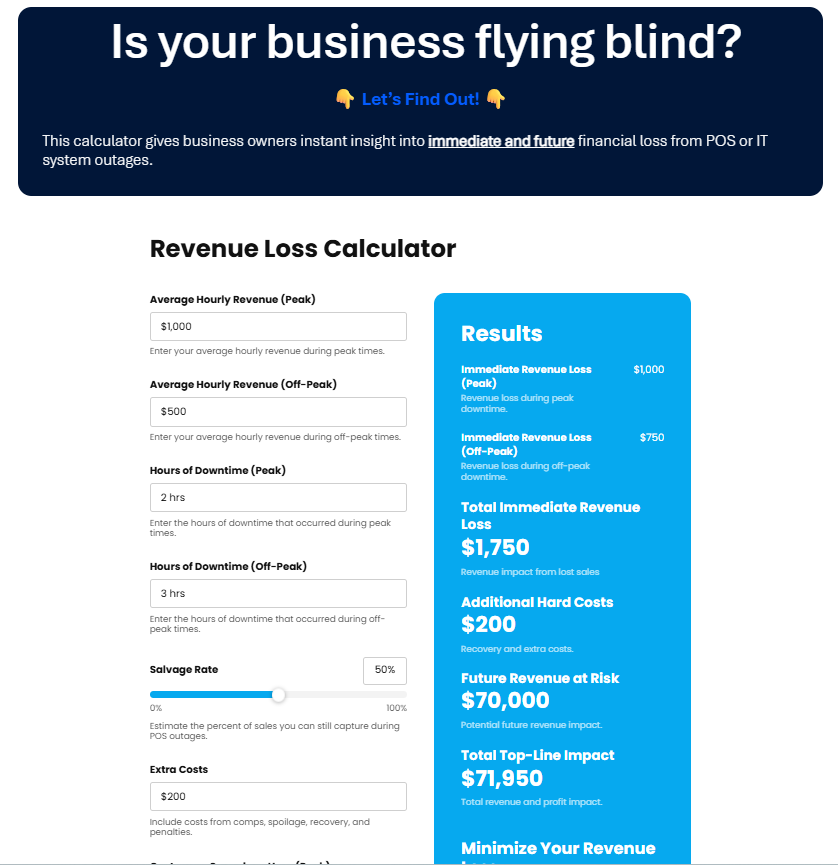
QSS POS Downtime Calculator
Five Questions Every Business Owner Should Ask After a POS Outage
Every outage presents an opportunity to improve future reliability. Instead of simply fixing the immediate issue, business owners should evaluate what happened and identify ways to reduce future risk.
Did We Have a Backup Plan?
Businesses should know exactly how employees will continue serving customers if the primary POS system becomes unavailable.
Offline payment options, backup internet connections, and documented emergency procedures can help minimize disruption.
How Long Did Recovery Actually Take?
Many organizations focus only on the outage itself while overlooking recovery time.
Ask questions such as:
How long before transactions returned to normal?
How much staff time was spent resolving issues?
How many customers were affected?
Understanding total recovery time provides a more accurate picture of business impact.
Which Systems Were Affected?
Modern POS platforms connect multiple business functions.
Review whether the outage interrupted:
Inventory management
Online ordering
Customer loyalty programs
Accounting
Employee scheduling
Payment processing
The more systems affected, the greater the overall operational impact.
Did Customers Experience Lasting Frustration?
Customer experience should always be part of the review process.
Monitor:
Customer complaints
Online reviews
Refund requests
Abandoned purchases
These indicators help measure the long-term effects of operational disruptions.
Could Better Technology Have Reduced the Impact?
Sometimes downtime cannot be completely avoided, but modern technology can significantly reduce both outage frequency and recovery time.
Businesses should periodically evaluate whether their current POS environment still supports their operational needs.
How Modern POS Systems Reduce Business Risk
Modern POS platforms offer more than faster checkout speeds. They provide tools that help businesses improve reliability, simplify management, and recover more quickly when issues occur.
Cloud-Based Reliability
Cloud-based systems reduce dependence on aging local servers and simplify software management.
Many platforms provide:
Automatic backups
Centralized reporting
Improved scalability
Better disaster recovery
These features help businesses maintain continuity during unexpected disruptions.
Automatic Software Updates
Outdated software is one of the leading causes of operational issues.
Modern POS systems regularly receive:
Performance improvements
Security patches
Compatibility updates
Bug fixes
Keeping systems current helps reduce unexpected failures while improving overall stability.
Offline Payment Capabilities
Some modern POS solutions allow businesses to continue processing certain transactions even if internet connectivity is temporarily unavailable.
Although capabilities vary by provider, offline functionality can help businesses continue serving customers during short-term connectivity issues.
Remote Monitoring
Many technology providers can remotely monitor system health and identify potential issues before they become major disruptions.
This proactive approach helps businesses resolve small problems before they affect daily operations.
How QSS Helps Businesses Reduce POS Downtime
Reliable technology is only one part of maintaining consistent business operations. Choosing the right technology partner is equally important.
QSS has helped restaurants, grocery stores, convenience stores, and retailers throughout New Jersey and New York City implement POS and payment solutions designed to improve reliability and reduce operational disruptions.
Building Reliable POS Environments
Modern POS platforms such as Clover combine payment processing, reporting, inventory management, and business operations within one integrated system.
QSS helps businesses deploy Clover solutions that match their operational requirements while improving system reliability and simplifying day-to-day management.
Keeping Payments Running Smoothly
Reliable payment processing is essential for minimizing interruptions during busy business hours.
QSS works with Shift4 payment technology to help businesses maintain secure, dependable transaction processing while supporting a wide variety of payment methods.
This combination helps reduce authorization delays, improve transaction reliability, and support a better customer experience.
Local Support Across NJ and NYC
Technology issues require timely responses.
Unlike providers that rely solely on national support centers, QSS understands the operational needs of businesses throughout New Jersey and New York City.
Local experience allows businesses to receive practical guidance from professionals familiar with regional retail and restaurant environments.
Supporting Long-Term Business Growth
Reducing downtime requires more than occasional repairs.
QSS works with businesses to
Evaluate current POS performance
Identify operational risks
Recommend technology improvements
Support future business growth
By focusing on long-term reliability instead of temporary fixes, businesses can improve both operational efficiency and customer satisfaction.
Conclusion: Downtime Is More Than Lost Revenue
Most businesses measure POS downtime by looking only at immediate sales losses.
In reality, the largest costs often appear later through reduced employee productivity, administrative work, inventory corrections, customer dissatisfaction, and missed future revenue opportunities.
Understanding these hidden costs helps business owners make more informed technology decisions and prioritize investments that improve reliability.
Modern POS systems, proactive maintenance, reliable payment processing, and experienced technology partners all play an important role in reducing downtime and supporting long-term business success.
Preparing for downtime is no longer just an IT responsibility it is an important part of protecting customer experience, employee productivity, and long-term business growth. Investing in reliable technology today can help businesses avoid far greater operational and financial costs in the future.
Frequently Asked Questions
What is POS downtime?
POS downtime occurs whenever a point-of-sale system cannot process transactions normally due to hardware failures, software issues, internet disruptions, payment processing problems, or system maintenance. Even brief outages can affect revenue, employee productivity, customer satisfaction, and operational efficiency across multiple areas of a business.Why is POS downtime more expensive than most businesses realize?
Many businesses calculate only immediate revenue loss. However, downtime also creates hidden costs such as employee overtime, inventory reconciliation, customer complaints, delayed reporting, administrative work, and lost customer loyalty. These indirect expenses often persist long after the POS system is back up and running.Which businesses suffer the most from POS downtime?
Restaurants, grocery stores, convenience stores, and retailers are particularly vulnerable because they process high transaction volumes throughout the day. These businesses depend on rapid checkout experiences, accurate inventory tracking, and integrated payment systems, making operational disruptions especially costly during peak business hours.Can cloud-based POS systems reduce downtime?
Cloud-based POS systems often improve reliability by providing automatic software updates, centralized management, data backups, and remote support capabilities. While no technology eliminates downtime, modern cloud platforms generally offer stronger performance and faster recovery than many traditional legacy systems.How can businesses estimate the financial impact of POS downtime?
Businesses should consider more than lost sales when calculating downtime costs. Labor expenses, administrative recovery, inventory corrections, customer retention, and future revenue loss all contribute to the total financial impact. Reviewing these factors provides a more accurate picture of operational risk.What should employees do during a POS outage?
Employees should follow documented emergency procedures that include communicating with customers, implementing backup payment processes, notifying managers, and contacting technical support. Having a clear response plan helps reduce confusion and minimizes operational disruption during unexpected outages.How often should businesses evaluate their POS system?
Businesses should review POS performance at least annually or whenever recurring technical issues begin affecting daily operations. Frequent slowdowns, outdated hardware, payment delays, or increasing maintenance costs may indicate it is time to upgrade technology or evaluate alternative solutions.How does QSS help businesses improve POS reliability?
QSS helps restaurants, retailers, grocery stores, and convenience stores implement reliable POS and payment solutions using trusted technologies like Clover and Shift4. Through system deployment, ongoing support, maintenance guidance, and operational consulting, QSS helps businesses reduce downtime while improving overall technology performance.Can businesses continue accepting payments during a POS outage?
Some modern POS systems offer offline payment capabilities that allow certain transactions to continue during temporary internet outages. Available features vary by provider, so businesses should understand exactly how their POS system operates during an interruption.
Protect Your Business Before Downtime Impacts Your Bottom Line
Every minute of POS downtime affects more than transactions. It can influence customer loyalty, employee productivity, operational efficiency, and long-term profitability.
QSS helps businesses throughout New Jersey and New York City build reliable POS environments using modern technology, secure payment solutions, and responsive local support.
Whether you're replacing an aging POS system, evaluating recurring technical issues, or planning for future growth, QSS can help you implement a solution designed to keep your business running smoothly.
Contact QSS today to schedule a POS system evaluation and discover how reliable technology can help reduce downtime, improve operational efficiency, and deliver a better customer experience.